Bloom Filters in Analytical Databases, Part 2: StarRocks
Series: Bloom Filters in ClickHouse and StarRocks Part 1: ClickHouse · Part 2: StarRocks (you are here) · Part 3: ClickHouse vs StarRocks
In Part 1 we looked at how ClickHouse uses Bloom filters as skip indexes: a small filter per block of granules that answers "can this block be skipped?".
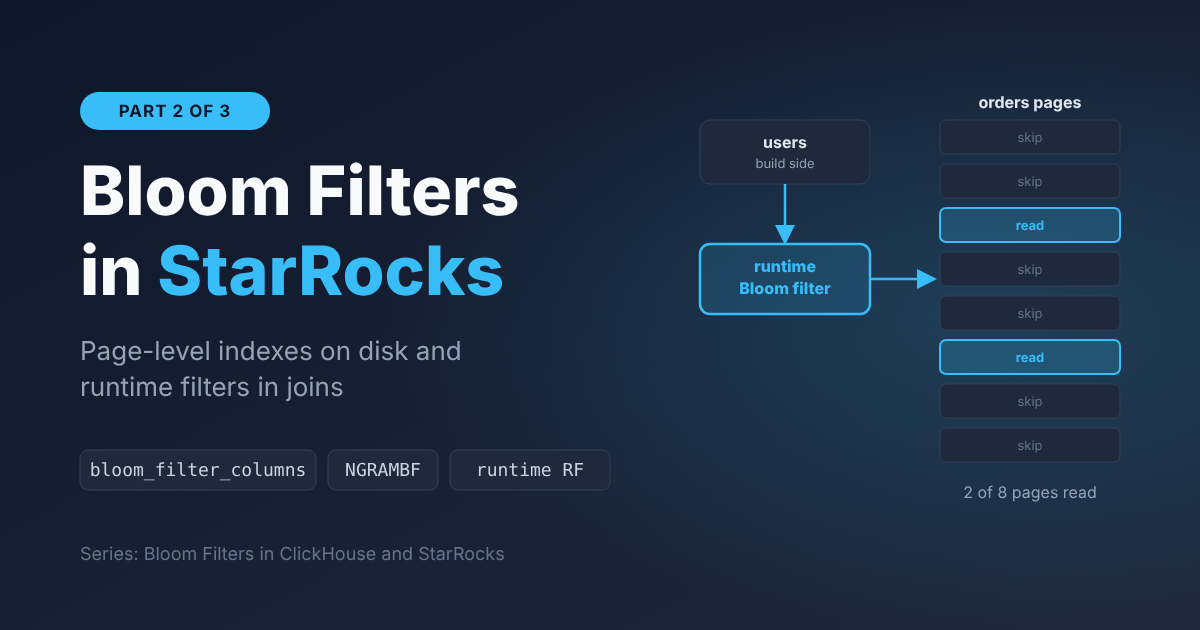
StarRocks uses Bloom filters too, but in two very different places:
| Bloom filter index | Runtime Bloom filter | |
|---|---|---|
| Where it lives | On disk, inside each segment | In memory, only during a query |
| Who creates it | You, per column | The optimizer, automatically |
| Built from | The column's own values, at load time | The build side of a hash join, at query time |
| Helps with | col = x, col IN (...) | JOIN ... ON a.key = b.key |
The first one is close to what ClickHouse does. The second one is where StarRocks gets a lot of its join performance, and most people use it without knowing it exists.
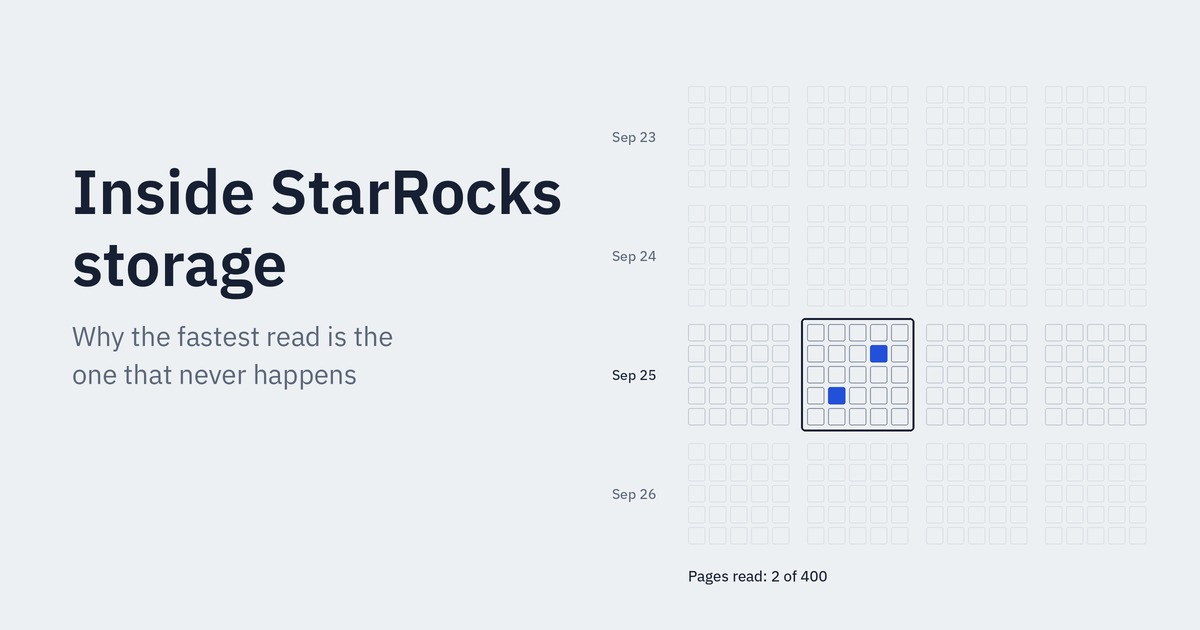
If you want the storage background first (segments, pages, short key index, zone maps), see my earlier post Inside StarRocks Storage. This post assumes you know what a segment and a data page are, and that you've read the Bloom filter basics in Part 1.
1. Where the Bloom filter index fits in a scan
When StarRocks reads a table, it removes data in stages. Each stage only works on what the previous one left behind:
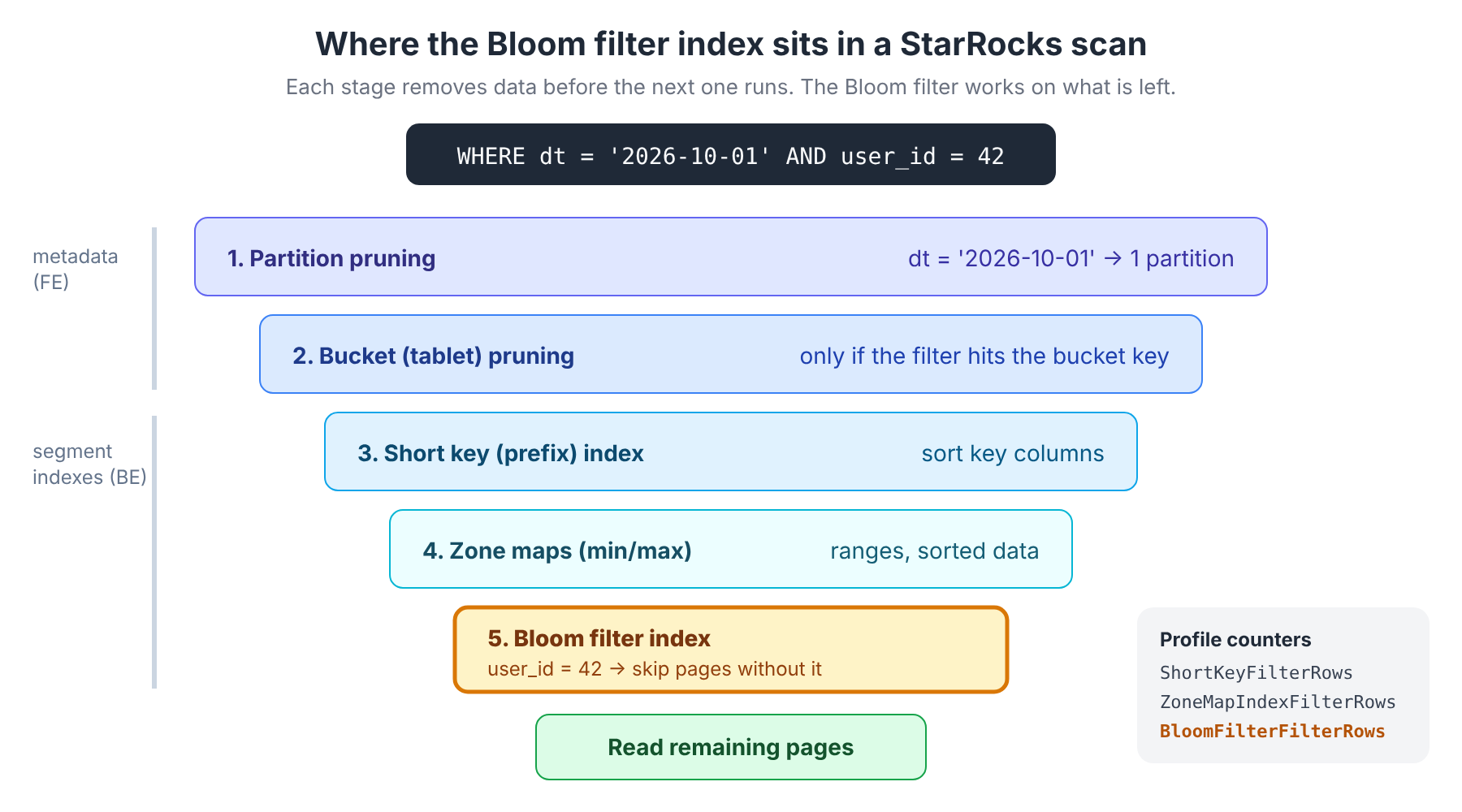
- Partition pruning on the FE, using the partition column.
- Bucket (tablet) pruning, if the filter hits the distribution key.
- Short key (prefix) index, for filters on the leading sort key columns.
- Zone maps, the min/max per page and per segment. Great for ranges on sorted data.
- Bloom filter index, for equality on columns that none of the above can help with.
That ordering explains when a Bloom filter index is worth creating. If your filter is on the sort key, the short key index already handles it. If your column is roughly sorted, zone maps already handle it. The Bloom filter index is for the column that's left over: high cardinality, not in the sort key, and queried by exact value. Think user_id, order_id, trace_id, device_id.
The StarRocks docs make the same point: the prefix index entry is limited to 36 bytes, so a column outside the sort key that you look up by ID is the classic use case for a Bloom filter index.
2. How the index is stored: one filter per page
A segment stores each column as a sequence of data pages (around 64 KB each). For a column with a Bloom filter index, StarRocks also writes one Bloom filter per data page into the segment's index region.
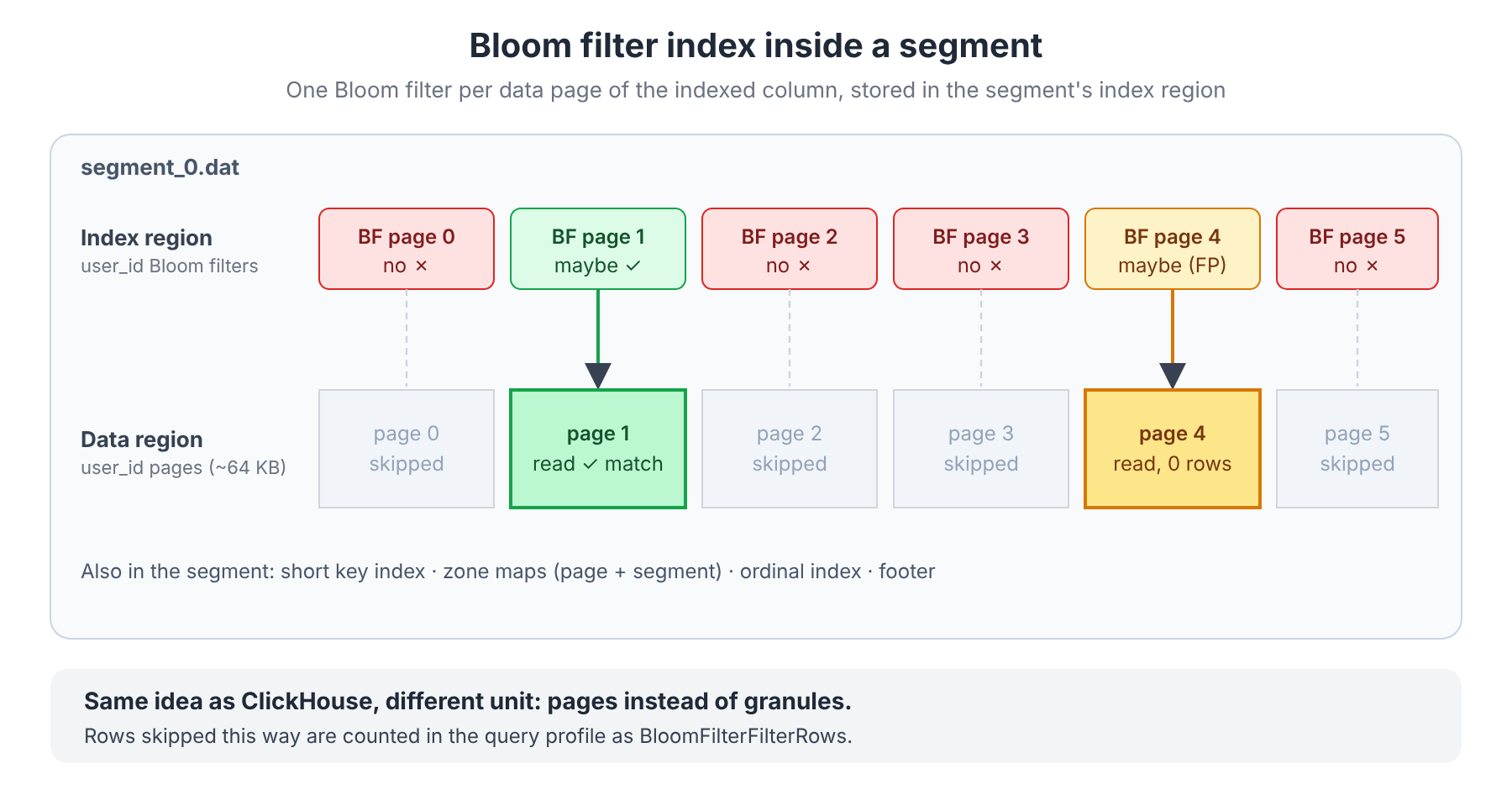
At query time, for WHERE user_id = 42:
- Each page's filter is checked.
- "No": the page is skipped. This is always safe, because Bloom filters have no false negatives.
- "Maybe": the page is read and the rows are checked. Sometimes it's a real match, sometimes a false positive (page 4 in the diagram).
If you read Part 1, this is the same mechanism as ClickHouse with a different unit: pages instead of granules. And the same rule applies: one matching row is enough to force reading the whole page. The more pages a value is spread across, the less the index helps.
3. Creating a Bloom filter index
At table creation
The classic Bloom filter index is a table property, not an INDEX clause:
CREATE TABLE orders
(
    dt          DATE,
    order_id    BIGINT,
    user_id     BIGINT,
    country     VARCHAR(8),
    amount      DECIMAL(18, 2),
    status      VARCHAR(16)
)
DUPLICATE KEY (dt, order_id)
PARTITION BY date_trunc('day', dt)
DISTRIBUTED BY HASH (order_id)
PROPERTIES (
    "bloom_filter_columns" = "user_id"
);
Multiple columns are comma-separated: "bloom_filter_columns" = "user_id,device_id".
On an existing table
-- Add (the list REPLACES the current one, so include existing columns)
ALTER TABLE orders SET ("bloom_filter_columns" = "user_id,device_id");

-- Remove one column (keep only user_id)
ALTER TABLE orders SET ("bloom_filter_columns" = "user_id");

-- Remove all
ALTER TABLE orders SET ("bloom_filter_columns" = "");

-- Check progress (the change is asynchronous)
SHOW ALTER TABLE COLUMN;

-- See what's currently defined
SHOW CREATE TABLE orders;
Two operational notes:
- Index changes run as asynchronous alter jobs, and only one alter job can run per table at a time. On a big table, plan for it the way you'd plan a schema change.
- Since the property takes the full list, a typo in
ALTER ... SETcan silently drop an index you meant to keep. Always copy the current value fromSHOW CREATE TABLEfirst.
What's supported
| Supported | |
|---|---|
| Operators | = and IN only |
| Column types | SMALLINT, INT, BIGINT, LARGEINT, CHAR, VARCHAR, STRING, DATE, DATETIME |
| Duplicate Key / Primary Key tables | Any column |
| Aggregate / Unique Key tables | Key columns only |
Things to notice:
TINYINT,FLOAT,DOUBLEandDECIMALaren't on the supported list. That's rarely a problem: those columns are almost never good Bloom filter candidates anyway.- Ranges (
>,<,BETWEEN),LIKE, and!=don't use it. Same reasons as in Part 1: a Bloom filter can only answer "is this exact value possibly here?". - Unlike ClickHouse's
bloom_filter(0.01), the classic index has no per-column false positive setting in the current docs. You choose which columns, not how big the filter is. Under the hood, StarRocks sizes each page's filter for a 5% false positive rate (the default in its storage code, about 6.2 bits per distinct value), which is looser than the 1% many people use in ClickHouse.
4. The NGram Bloom filter index: for LIKE
For substring search, StarRocks has a second, separate index type: the NGram Bloom filter (NGRAMBF). It works like ClickHouse's ngrambf_v1: every substring of length n is inserted into the filter.
Unlike the classic index, it's declared with an INDEX clause and has tunable parameters:
CREATE TABLE app_logs
(
    ts       DATETIME,
    service  VARCHAR(64),
    message  STRING,
    INDEX idx_msg_ngram (message) USING NGRAMBF (
        "gram_num"         = "4",
        "bloom_filter_fpp" = "0.01",
        "case_sensitive"   = "true"
    ) COMMENT 'ngram index for LIKE search'
)
DUPLICATE KEY (ts, service)
DISTRIBUTED BY HASH (service);
Or on an existing table:
ALTER TABLE app_logs
ADD INDEX idx_msg_ngram (message) USING NGRAMBF ("gram_num" = "4", "bloom_filter_fpp" = "0.01");

ALTER TABLE app_logs DROP INDEX idx_msg_ngram;

SHOW INDEX FROM app_logs;| Parameter | Default | Meaning |
|---|---|---|
gram_num | 2 | Length of each ngram |
bloom_filter_fpp | 0.05 | Target false positive rate, from 0.0001 to 0.05 |
case_sensitive | true | Set to false to support ngram_search_case_insensitive |
What it speeds up:
LIKE, but only when the search string is at leastgram_numcharacters long. Withgram_num = 4,LIKE '%abcd%'can use the index;LIKE '%abc%'can't.ngram_search(col, 'text', gram_num): rows with similarity 0 are filtered out by the index, but only if the function'sgram_nummatches the index.ngram_search_case_insensitive: only if the index was created withcase_sensitive = false.
Limitations:
- It's marked Beta in the current docs.
- A column can have either a classic Bloom filter index or an NGram one, not both.
- Only string types (
CHAR,VARCHAR,STRING).
The sizing lesson from Part 1 applies here too: a long text value produces many ngrams, so the filter for each page fills up quickly. For "search for words in log messages", look at StarRocks' full-text inverted index (available since 3.3, also Beta) before reaching for NGram.
5. Verifying the index is used: the query profile
StarRocks doesn't show stored index usage in EXPLAIN. The evidence is in the query profile.
SET enable_profile = true;

SELECT * FROM orders
WHERE dt = '2026-10-01' AND user_id = 42;

-- Then open the profile for that query, e.g. (3.1+):
-- SHOW PROFILELIST;
-- ANALYZE PROFILE FROM '<query_id>';
-- or simply:
-- EXPLAIN ANALYZE SELECT ...;
In the OLAP_SCAN operator, look for these counters (example output, abbreviated):
OLAP_SCAN (plan_node_id=0)
  Table: orders
  RawRowsRead: 12.29K
  RowsRead: 3
  ...
  SegmentInit:
    ShortKeyFilterRows: 0
    ZoneMapIndexFilterRows: 0
    BloomFilterFilterRows: 41.93M
How to read it:
| Counter | Meaning |
|---|---|
BloomFilterFilterRows | Rows skipped because the Bloom filter said "not here". This is the number you want to be large. |
ShortKeyFilterRows, ZoneMapIndexFilterRows | Rows skipped by the earlier stages. If these are already huge, the Bloom filter has little left to do. |
RawRowsRead vs RowsRead | Rows actually read from pages vs rows that survived the predicate. A big gap means many "maybe" pages were false positives, or the value is scattered. |
PushdownPredicates | If this is 0, your predicate isn't reaching the storage layer at all, so no index can help. |
If BloomFilterFilterRows is 0 or missing, check the usual suspects:
- The operator isn't
=orIN(e.g.LIKE, a range, or a function wrapped around the column likeCAST(user_id AS VARCHAR) = '42'). - The column isn't actually in
bloom_filter_columns(checkSHOW CREATE TABLE). - The alter job hasn't finished yet (check
SHOW ALTER TABLE COLUMN).
6. Runtime Bloom filters: the ones you don't create
So far, everything has been about filters stored on disk. The other half of the story happens during joins, and it doesn't need any DDL.
Take this query:
SELECT o.order_id, o.amount
FROM orders o
JOIN users u ON o.user_id = u.id
WHERE u.country = 'NL';
users filtered to the Netherlands is small. orders is huge. Without help, StarRocks would scan all of orders and throw most rows away in the join. Instead:
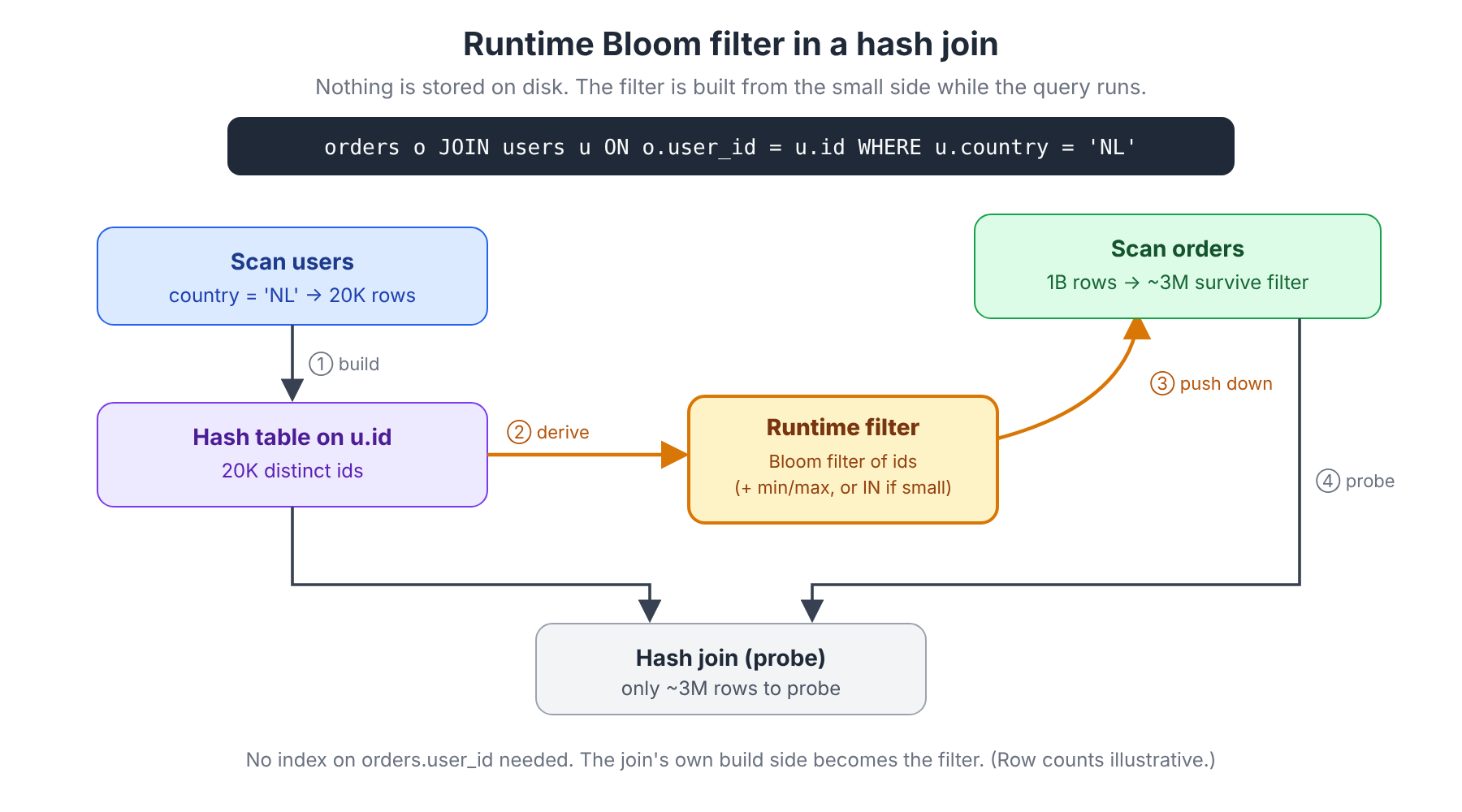
- Build: StarRocks scans the small side (
users,country = 'NL') and builds the hash table onu.id. - Derive: from the keys in that hash table, it derives a runtime filter: a min/max range, an
INlist (if there are few keys), or a Bloom filter. - Push down: the filter is sent to the scan of the big side (
orders) and applied too.user_idbefore the rows reach the join. Newer versions can push it into the storage layer, so pages can be skipped, not just rows dropped. - Probe: the join only sees rows that could possibly match.
Notice what's missing: no index on orders.user_id. The join builds the filter from the data it already has in memory, specifically for this query and these values. That's the big conceptual difference from the stored index.
Local vs global runtime filters
How the filter gets from the build side to the scans depends on how the join is distributed:
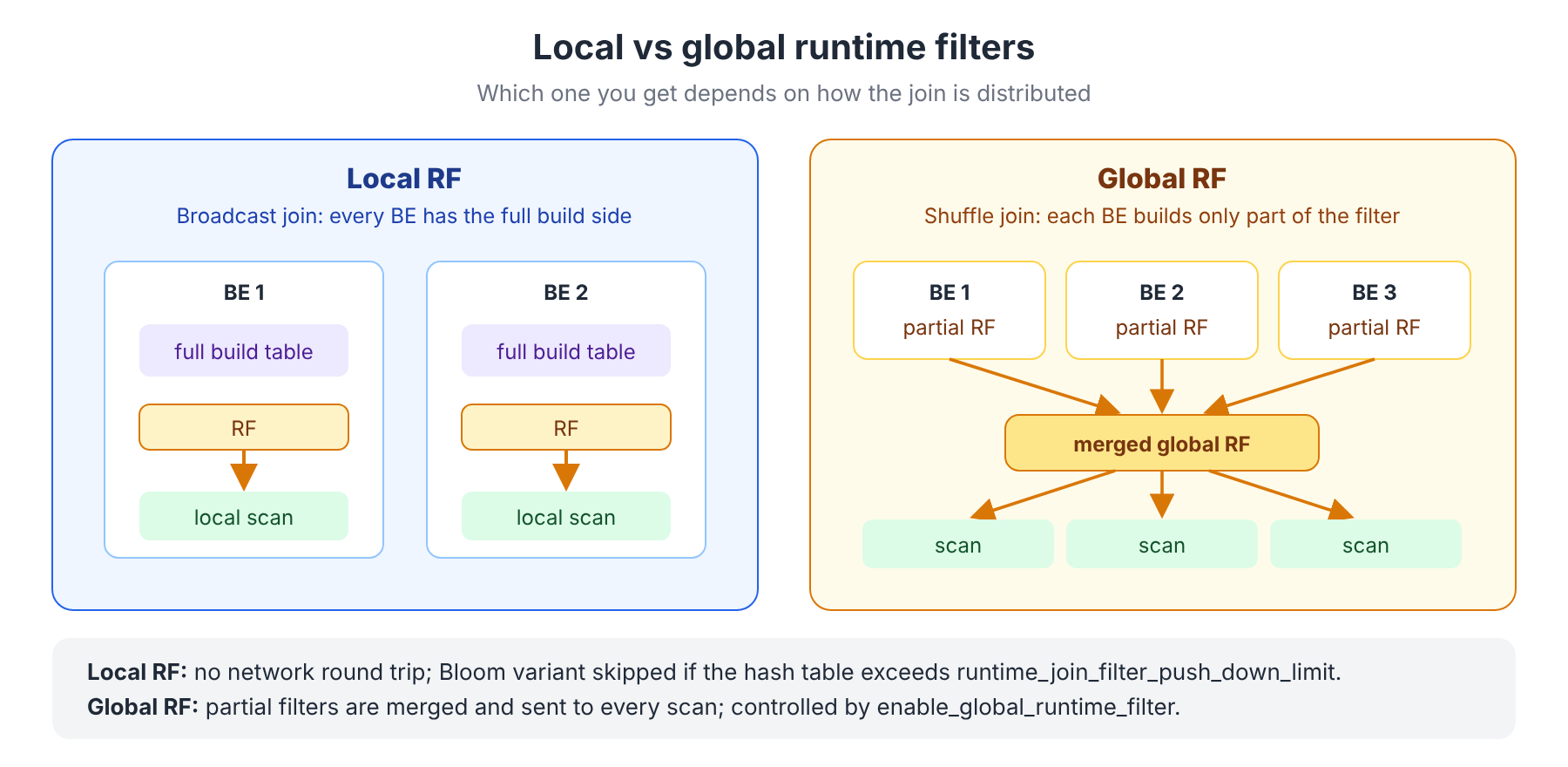
- Local RF (broadcast join): every BE has a full copy of the build side, so each BE can build a complete filter and apply it to its own scans. No network round trip.
- Global RF (shuffle join): each BE only holds part of the build side. The partial filters are merged and the result is sent to every scan of the probe side.
Seeing runtime filters in EXPLAIN
Runtime filters do show up in the plan. Look for build runtime filters on the join and probe runtime filters on the scan (abbreviated):
  4:HASH JOIN
  |  join op: INNER JOIN (BROADCAST)
  |  equal join conjunct: 3: user_id = 8: id
  |  build runtime filters:
  |  - filter_id = 0, build_expr = (8: id), remote = false
  ...
  0:OlapScanNode
     TABLE: orders
     ...
     probe runtime filters:
     - filter_id = 0, probe_expr = (3: user_id)
remote = false means a local filter; remote = true means a global one.
In the profile, the join operator reports JoinRuntimeFilterInputRows, JoinRuntimeFilterOutputRows and JoinRuntimeFilterEvaluate. A large drop from input to output rows means the filter is working.
The knobs
| Session variable | Default | What it does |
|---|---|---|
enable_global_runtime_filter | true | Enables global RF for shuffle joins. Local RF still works when this is off. |
runtime_join_filter_push_down_limit | 1024000 | Max rows in the build-side hash table for generating a local Bloom RF. Above this, the local Bloom filter isn't built, because it would be too big to be useful. |
enable_multicolumn_global_runtime_filter | false | Global RF for joins with multiple equality conditions. When off, those joins only get local RF. |
runtime_filter_on_exchange_node | false | Also keep the global RF on the exchange node after it's pushed down. Delivery is best-effort, so this is a safety net at some CPU cost. |
In practice you rarely need to touch these. The bigger lever is writing joins that runtime filters can work with.
When runtime filters don't kick in
The StarRocks tuning guide has a telling symptom: a tiny JoinRuntimeFilterEvaluate together with full table scans means the filter never reached the scan. The common causes:
- The join condition isn't a plain equality. A function or an inequality in
ONcan turn the hash join into a nested loop join, and nested loop joins don't produce runtime filters. - The join keys have different types (
BIGINTvsVARCHAR, for example). The implicit cast gets in the way. Fix the schema or cast explicitly on the small side. - The build side isn't small or selective. If the "small" side has millions of distinct keys, the Bloom filter is huge and lets almost everything through. Push filters into the build side first.
- Multi-column joins on a shuffle join, with
enable_multicolumn_global_runtime_filteroff.
7. When the stored index doesn't help
Everything from Part 1's "data distribution decides everything" section applies to StarRocks unchanged, just with pages instead of granules:
| Situation | Why it fails | Better option |
|---|---|---|
Low cardinality (status, country) | Every page contains every value | Bitmap index, or add the column to the sort key |
Value scattered across the table (a busy user_id in a time-sorted table) | It's in almost every page, so every filter says "maybe" | Make it part of the sort key, or use a materialized view sorted by it |
Range filters (amount > 100) | Bloom filters can't answer ranges | Zone maps (automatic), work best on sorted data |
| Column already a prefix of the sort key | Short key index already does better | Don't add a Bloom filter |
| Filter on a joined column | The value list comes from another table | Let runtime filters do it, no index needed |
| Substring search on long text | Classic index can't do LIKE | NGram index, or the full-text inverted index |
And the costs are the same kind as in ClickHouse: extra work at load and compaction, extra disk, and an index check on every query that touches the column, even when it doesn't skip anything. Measure BloomFilterFilterRows before and after, on real queries.
TL;DR
- StarRocks has two Bloom filter mechanisms: a stored index (on disk, per data page) and runtime filters (in memory, built during joins).
- The stored index is a table property:
"bloom_filter_columns" = "user_id". It helps only=andIN, on high-cardinality columns that aren't in the sort key. - For
LIKE, there's a separate NGram index (USING NGRAMBF, Beta) withgram_numandbloom_filter_fpp. - Verify stored indexes with
BloomFilterFilterRowsin the query profile; verify runtime filters withbuild/probe runtime filtersinEXPLAIN. - Runtime filters need no DDL. Keep join conditions as plain equalities on matching types, and keep the build side small and selective.
- As in ClickHouse: data layout matters more than the index. A rare, clustered value skips almost everything; a scattered value skips nothing.
Next up: Part 3, side by side
In Part 3 we'll put ClickHouse and StarRocks next to each other: granules vs pages, bloom_filter(p) vs bloom_filter_columns, ngrambf_v1 vs NGRAMBF, how each one reports what it skipped, and what ClickHouse offers in place of StarRocks' runtime join filters.
👉 Read Part 3: ClickHouse vs StarRocks, side by side
References
- StarRocks docs: Bloom filter indexes
- StarRocks docs: N-gram Bloom filter indexes
- StarRocks docs: Full-text inverted index
- StarRocks docs: System variables (runtime filter settings)
- StarRocks docs: Query tuning recipes
- StarRocks blog: Inside StarRocks, why joins are faster than you'd expect
- Part 1: Bloom Filters in Analytical Databases, ClickHouse
- Inside StarRocks Storage: Why the Fastest Read Is the One That Never Happens