Bloom Filters in Analytical Databases, Part 1: ClickHouse
Series: Bloom Filters in ClickHouse and StarRocks Part 1: ClickHouse (you are here) · Part 2: StarRocks · Part 3: ClickHouse vs StarRocks
You have a 2 billion row logs table in ClickHouse. It's ordered by (service_name, timestamp), and queries that filter on those columns finish in milliseconds. Then someone pastes a trace ID into a dashboard:
SELECT * FROM otel_logs WHERE trace_id = '4bf92f3577b34da6a3ce929d0e0e4736';and ClickHouse scans the entire trace_id column. It's still fast by most databases' standards, but it reads billions of values to return a handful of rows.
This is the problem Bloom filter indexes in ClickHouse are built for. In this post we'll cover:
- What a Bloom filter is (in two minutes)
- Why ClickHouse uses it as a skip index rather than a classic index
- The three flavors:
bloom_filter,tokenbf_v1,ngrambf_v1 - How to size them
- How to verify they're actually helping
- When they don't help, and what to use instead
1. Bloom filters in two minutes
A Bloom filter is a bit array plus a few hash functions. To add a value, you hash it with each function and set those bit positions to 1. To check a value, you hash it the same way and look at those bits:
- If any bit is
0, the value was definitely never added. - If all bits are
1, the value may have been added. Those bits could also have been set by other values. That case is a false positive.
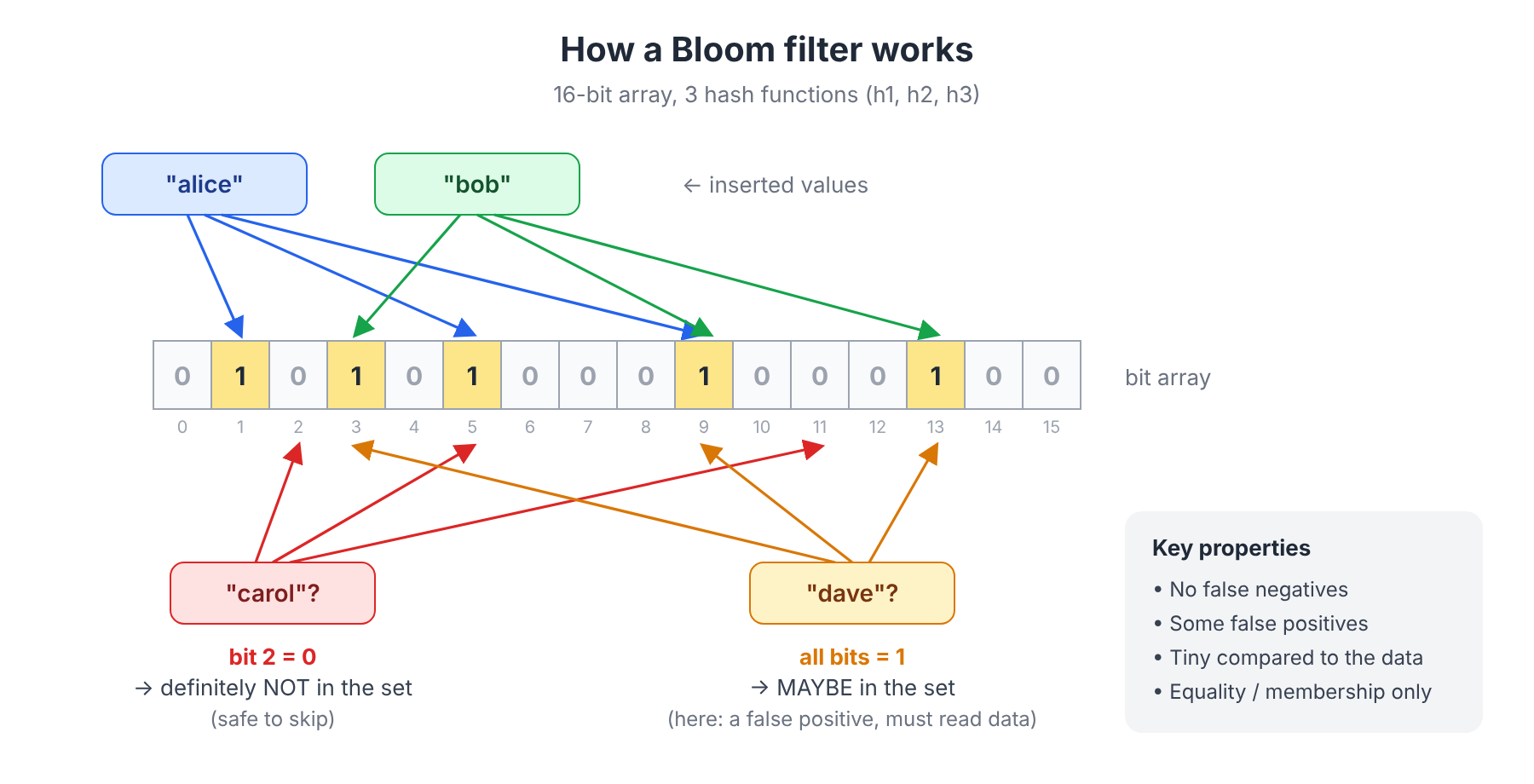
That asymmetry is the whole trick:
| Property | What it means for a database |
|---|---|
| No false negatives | If the filter says "no", skipping the data is always safe. You never lose correct results. |
| Some false positives | Sometimes you read data you didn't need. It costs I/O but never correctness. |
| Very compact | ~10 bits per distinct value gives a ~1% false positive rate, no matter how long the values are. |
| Membership only | It answers "is X in here?", not "is there anything between X and Y?". No range queries. |
2. How ClickHouse uses it: skip indexes, not row pointers
If you come from PostgreSQL or MySQL, you probably think of an index as a structure that points at rows. ClickHouse doesn't work like that.
MergeTree tables store each column in compressed blocks, and reads happen in granules (8,192 rows by default, set by index_granularity). The primary key is a sparse index: it records one entry per granule, not per row.
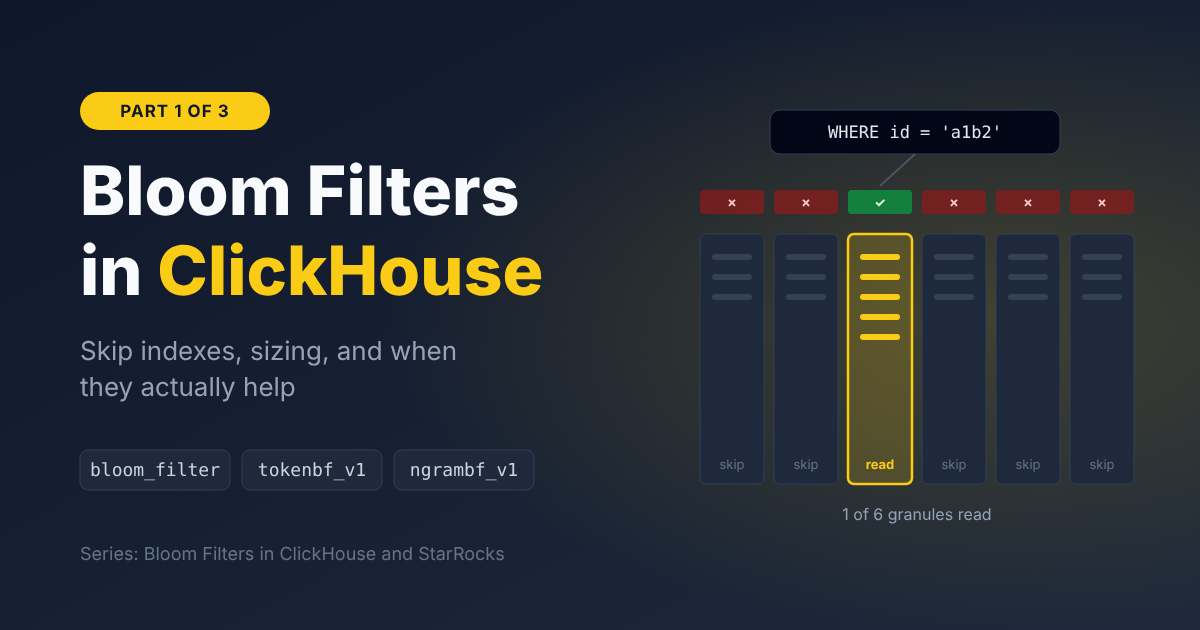
A data skipping index follows the same idea. For every block of GRANULARITY granules, ClickHouse stores a small summary. At query time it checks the summary and decides: can this block possibly contain a match? If not, the block is never read.
A Bloom filter index stores one Bloom filter per block:
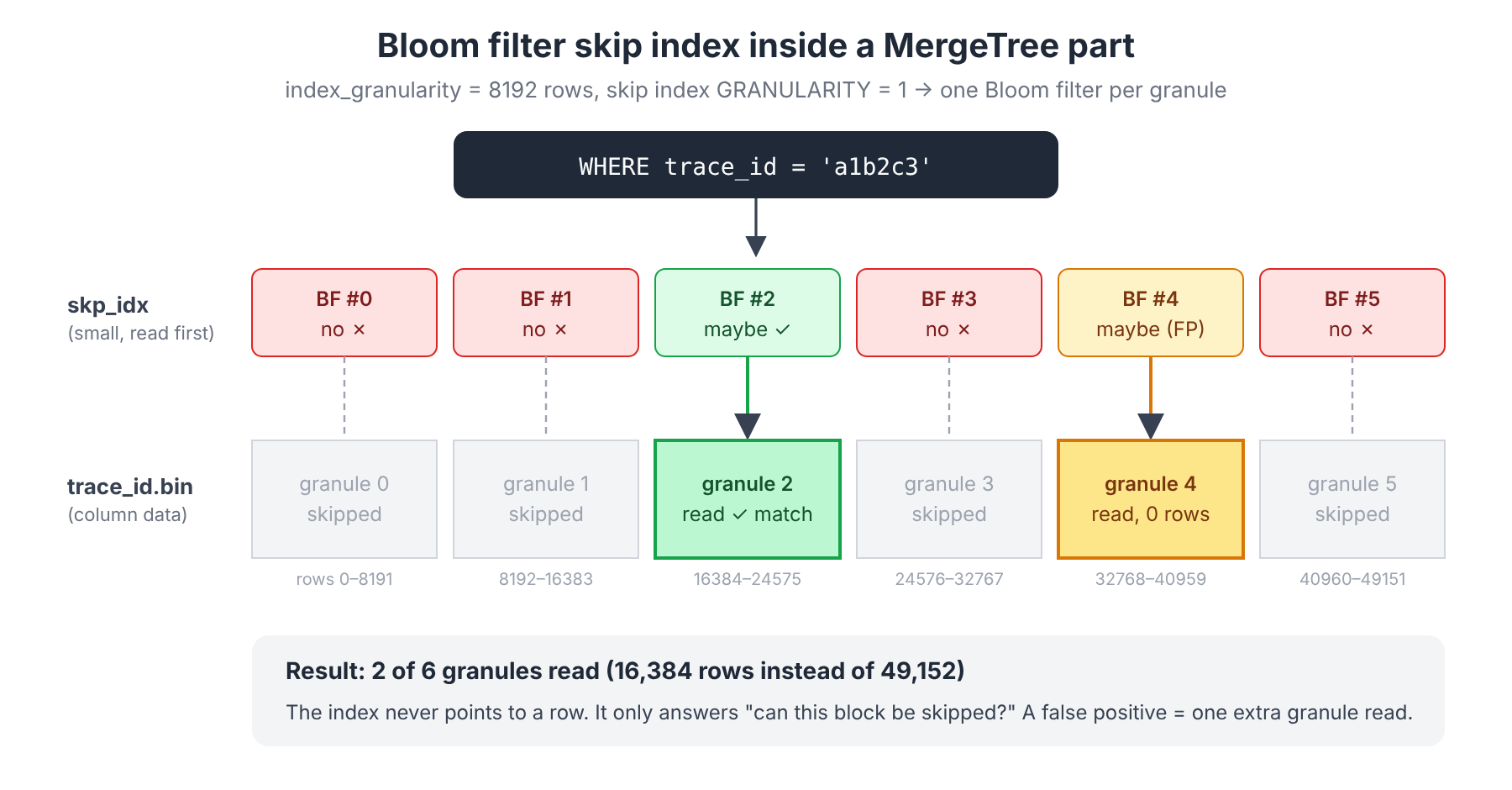
Two things follow from this design:
- The best case is "read only the granules that contain the value", not "read only the matching rows". Even with a perfect index, you read at least one full granule (8,192 rows) per match.
- A single matching row is enough to force reading a whole granule. The more granules the value is spread across, the less the index helps. Section 6 comes back to this, because it's the most important point in the whole post.
The index lives next to the column data in each part as skp_idx_<name>.idx (plus a marks file). It's built at insert time and rebuilt during merges.
3. The three flavors
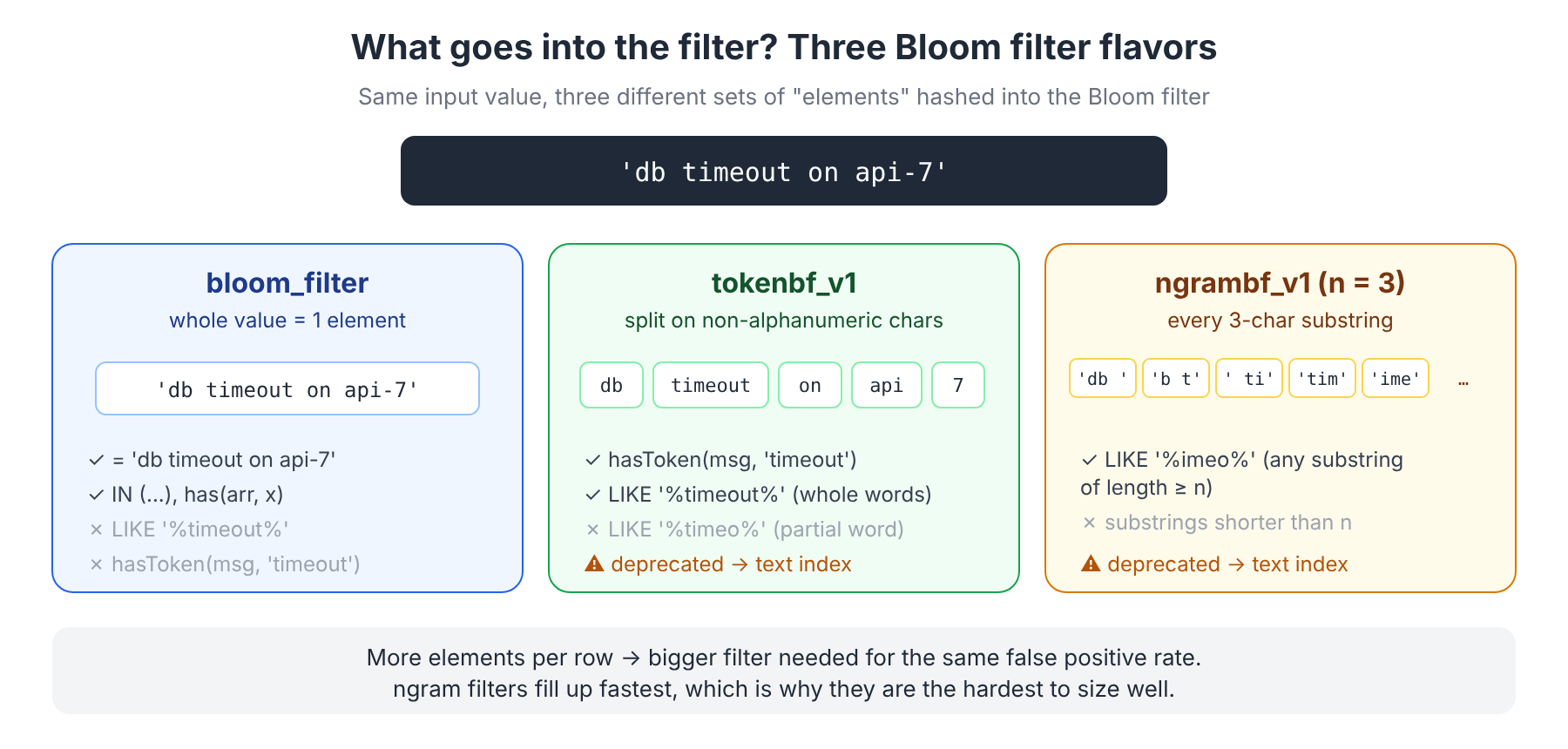
ClickHouse has three skip index types built on Bloom filters. They all use the same bit array; what differs is what gets inserted into it.
3.1 bloom_filter: whole values
INDEX idx_trace_id trace_id TYPE bloom_filter(0.01) GRANULARITY 1- Each value is one element. The only parameter is the target false positive rate (default
0.025). ClickHouse sizes the filter for you. - Works with most scalar types: integers, floats,
String,FixedString,UUID,Date/DateTime,Enum, plusNullableandLowCardinalitywrappers. - Works with arrays (each element is added) and with maps through
mapKeys()/mapValues(). - Helps with:
=,IN,has(),hasAny(),hasAll(). - Doesn't help with:
LIKE, ranges (<,>,BETWEEN), or negative conditions (!=,NOT IN). A Bloom filter can prove a value is absent from a block, but it can't prove every value in the block equals X.
The map pattern is common in observability schemas. The ClickHouse OpenTelemetry exporter uses it:
INDEX idx_log_attr_key   mapKeys(LogAttributes)   TYPE bloom_filter(0.01) GRANULARITY 1,
INDEX idx_log_attr_value mapValues(LogAttributes) TYPE bloom_filter(0.01) GRANULARITY 1
so that queries like WHERE LogAttributes['http.status_code'] = '503' can skip blocks where that key or value never appears.
3.2 tokenbf_v1: words inside strings
INDEX idx_body body TYPE tokenbf_v1(32768, 3, 0) GRANULARITY 1
--                                   │      │  └ hash seed
--                                   │      └ number of hash functions
-- └ filter size in BYTES (per block)- The string is split on non-alphanumeric characters, and each token is added to the filter.
'db timeout on api-7'becomesdb,timeout,on,api,7. - Helps with
hasToken(body, 'timeout'),=,IN, andLIKEpatterns made of whole tokens. - Doesn't help with partial words:
LIKE '%timeo%'can't use it, becausetimeowas never inserted. - You size it yourself (see section 4).
3.3 ngrambf_v1: substrings
INDEX idx_body body TYPE ngrambf_v1(3, 65536, 3, 0) GRANULARITY 1
-- └ n (ngram length), then same as tokenbf_v1- Every substring of length
ngoes into the filter. That's why it can help with arbitraryLIKE '%...%'searches, as long as the search string is at leastncharacters long. - It's also useful for languages without spaces between words, such as Chinese or Japanese.
- The downside: a 200-character log line produces ~198 ngrams. The filter fills up fast and needs to be much larger than a token filter to stay useful.
⚠️ About full-text search: current ClickHouse docs mark
tokenbf_v1andngrambf_v1as deprecated for full-text search and recommend the newertextindex, a real inverted index with functions likehasAnyToken/hasAllTokens. If you're on a recent version and your use case is "search words in log bodies", evaluate the text index first. The token/ngram Bloom filters are still widely deployed, and the sizing and debugging ideas below apply to them. Plainbloom_filteron ID-like columns is unaffected and remains the right tool for that job.
Quick decision table
| Query pattern | Index to use |
|---|---|
id = 'x', id IN (...) on a high-cardinality column | bloom_filter |
has(tags, 'x') on an Array column | bloom_filter |
attrs['key'] = 'x' on a Map column | bloom_filter on mapKeys() / mapValues() |
| Find a word in free text | text index (new), or tokenbf_v1 (legacy) |
LIKE '%arbitrary substring%' | text index with an ngram tokenizer, or ngrambf_v1 (legacy) |
ts BETWEEN ..., price > 100 | Not a Bloom filter: use minmax |
| Low-cardinality column, few values per block | Not a Bloom filter: use set(N) |
4. Sizing: the knobs and the math
bloom_filter(p): pick a false positive rate
The standard Bloom filter formulas: for n distinct values and a target false positive rate p,
bits per value  =  -ln(p) / (ln 2)²
hash functions  =  bits per value × ln 2
Target FPR p | Bits per distinct value | Hash functions | Filter size for 8,192 distinct values |
|---|---|---|---|
| 0.025 (default) | ~7.7 | ~5 | ~7.7 KB |
| 0.01 | ~9.6 | ~7 | ~9.6 KB |
| 0.001 | ~14.4 | ~10 | ~14.7 KB |
For a trace_id column (32 hex characters, 8,192 per granule ≈ 256 KB raw), a ~10 KB filter per granule is a small overhead. Going from 2.5% to 1% is usually worth it on ID columns. Going lower rarely is: past a point, the bottleneck is the data distribution, not false positives (section 6).
tokenbf_v1 / ngrambf_v1: you set bytes and hash count
Here you choose the size m (in bytes) and the number of hash functions k directly. The false positive rate depends on how many distinct tokens/ngrams each block contains (n):
FPR ≈ (1 − e^(−k·n / m_bits))^k
Worked example with tokenbf_v1(32768, 3, 0), a 32 KB = 262,144-bit filter:
| Distinct tokens per block | Approx. FPR |
|---|---|
| 5,000 | ~0.02% |
| 10,000 | ~0.13% |
| 50,000 | ~8% |
| 150,000 | ~55% (the filter is close to useless) |
The takeaway: estimate the distinct tokens per block on your real data before picking a size. You can measure it directly:
-- Distinct tokens per 8192-row block (approximation of what the filter sees)
SELECT
    block,
    uniqExact(token) AS distinct_tokens
FROM
(
    SELECT
        intDiv(rowNumberInAllBlocks(), 8192) AS block,
        splitByNonAlpha(body) AS tokens
    FROM
    (
        SELECT body
        FROM otel_logs
        WHERE timestamp >= now() - INTERVAL 1 HOUR
        LIMIT 1000000
    )
)
ARRAY JOIN tokens AS token
GROUP BY block
ORDER BY block
LIMIT 20;
Then plug the typical value into a Bloom filter calculator (e.g. hur.st/bloomfilter) or into the formula above.
GRANULARITY: how many granules per filter
GRANULARITY 1 means one filter per granule (8,192 rows). GRANULARITY 4 means one filter per 4 granules (32,768 rows).
- Larger values give fewer, bigger blocks: less index metadata, but each block holds more distinct values. That raises the FPR for
bloom_filter, and for token/ngram filters with a fixed byte size it can saturate them. Skipping also gets coarser. - Smaller values give finer skipping and more index entries to check.
For Bloom filters on ID-like columns, GRANULARITY 1 is a sensible starting point. Set it explicitly instead of relying on version defaults.
5. Putting it together: create, backfill, verify
Create
CREATE TABLE otel_logs
(
    timestamp     DateTime64(9),
    service_name  LowCardinality(String),
    severity      LowCardinality(String),
    trace_id      String,
    body          String,
    LogAttributes Map(LowCardinality(String), String),

    INDEX idx_trace_id   trace_id                TYPE bloom_filter(0.01) GRANULARITY 1,
    INDEX idx_attr_keys  mapKeys(LogAttributes)  TYPE bloom_filter(0.01) GRANULARITY 1,
    INDEX idx_attr_vals  mapValues(LogAttributes) TYPE bloom_filter(0.01) GRANULARITY 1
)
ENGINE = MergeTree
PARTITION BY toDate(timestamp)
ORDER BY (service_name, timestamp);
Adding an index to an existing table
ALTER TABLE otel_logs
    ADD INDEX idx_trace_id trace_id TYPE bloom_filter(0.01) GRANULARITY 1;

-- ADD INDEX only applies to newly written parts.
-- Build it for existing data (runs as a mutation, can be heavy on big tables):
ALTER TABLE otel_logs MATERIALIZE INDEX idx_trace_id;

-- Or limit the backfill to recent partitions:
ALTER TABLE otel_logs MATERIALIZE INDEX idx_trace_id IN PARTITION '2026-10-09';
Track progress in system.mutations.
Verify it's actually used: EXPLAIN indexes = 1
This is the single most useful command for skip indexes:
EXPLAIN indexes = 1
SELECT * FROM otel_logs
WHERE trace_id = '4bf92f3577b34da6a3ce929d0e0e4736';
Example output (abbreviated):
ReadFromMergeTree (default.otel_logs)
Indexes:
  PrimaryKey
    Condition: true
    Parts: 24/24
    Granules: 244141/244141
  Skip
    Name: idx_trace_id
    Description: bloom_filter GRANULARITY 1
    Parts: 2/24
    Granules: 3/244141
How to read it:
PrimaryKey ... Granules: 244141/244141: the primary key couldn't help (noservice_name/timestampfilter).Skip ... Granules: 3/244141: the Bloom filter reduced the read from ~2 billion rows to 3 granules (~24k rows).- If the
Skipsection is missing, the index wasn't applied. The usual causes are the function (e.g.LIKEon abloom_filter), an expression mismatch (index onlower(x)but query usesx), or parts where the index hasn't been materialized yet. - If it's present but
Granules: 240000/244141, the index runs but skips almost nothing. Go to section 6.
For more detail at runtime, enable trace logs in clickhouse-client:
SET send_logs_level = 'trace';
-- ... Index `idx_trace_id` has dropped 244138/244141 granules.
Check the storage cost
SELECT
    name,
    type_full,
    formatReadableSize(data_compressed_bytes)   AS compressed,
    formatReadableSize(data_uncompressed_bytes) AS uncompressed
FROM system.data_skipping_indices
WHERE table = 'otel_logs';
Compare this against the size of the indexed column in system.columns. For ID columns at p = 0.01, a few percent of the column size is normal. Bloom filter bits look random, so they barely compress.
Useful settings
| Setting | What it does |
|---|---|
use_skip_indexes = 0 | Turns skip indexes off for a query. Good for A/B comparisons, or for queries where the index is pure overhead. |
force_data_skipping_indices = 'idx_trace_id' | Throws an error if the query doesn't use the named index. Useful as a guardrail against expensive full scans. |
6. When Bloom filters don't help
This is where most disappointment with skip indexes comes from, so it gets its own section.
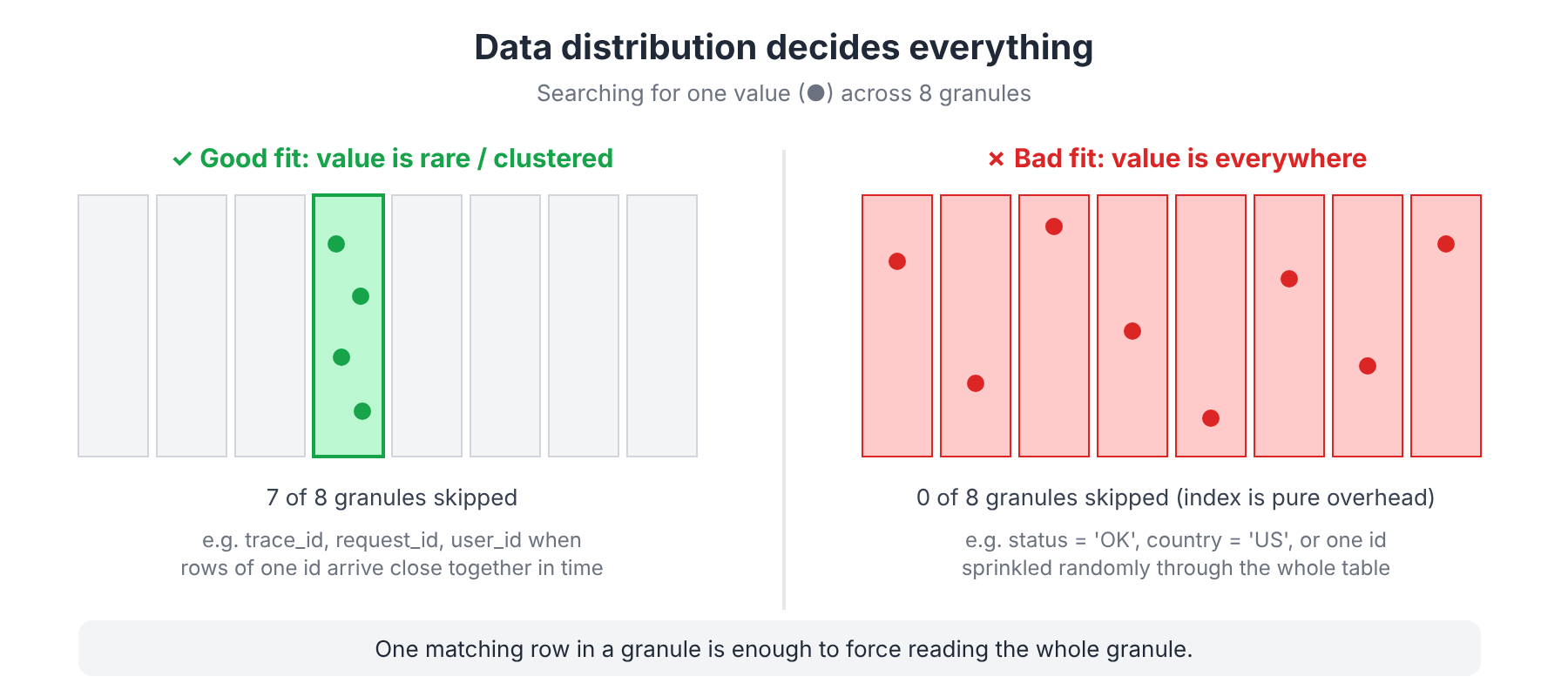
A Bloom filter skip index only pays off when the value you're searching for is absent from most blocks. That happens when:
- The column has high cardinality, so any single value is rare, and
- Rows with the same value are physically close together, usually because they correlate with the sorting key.
trace_id in a time-ordered logs table is the textbook good case. All spans of a trace are written within seconds of each other, so they land in one or two granules.
Bad cases:
| Situation | Why it fails | Better option |
|---|---|---|
Low cardinality (status, country) | Every block contains every value; nothing is skipped | set(N) index, or put the column in ORDER BY |
High cardinality but randomly scattered (a user_id that's active all day, in a table sorted by time) | Each user appears in thousands of blocks, so you read thousands of granules | A projection or materialized view ordered by user_id |
Range predicates (amount > 100) | Bloom filters can't answer ranges | minmax index |
Negative predicates (!=, NOT IN, NOT LIKE) | Can't prove "every value differs" | Usually none; rethink the query |
| Saturated token/ngram filter | FPR near 100%, so every block "maybe" matches | Bigger filter, smaller GRANULARITY, or the text index |
The column is already a prefix of ORDER BY | The primary key already skips better | Drop the skip index |
Also keep in mind that skip indexes aren't free:
- Inserts and merges get slower because every new part builds the filters.
- Queries that can't skip much still pay to read and check the index.
- They add disk and memory overhead.
The ClickHouse docs put it well: test on real data, with real queries, and compare EXPLAIN indexes = 1 with and without the index (use_skip_indexes = 0).
Before reaching for a Bloom filter, ask:
- Can I change
ORDER BY? A column in the sorting key beats any skip index. - Can a projection or materialized view store the data ordered by this column?
- Is the value rare and clustered? If yes, a Bloom filter is a great, cheap win.
TL;DR
- ClickHouse Bloom filter indexes are skip indexes: they decide which granules to skip, they never point to rows.
- Use
bloom_filterfor=/IN/has()on high-cardinality IDs, arrays and map keys/values. Start withbloom_filter(0.01) GRANULARITY 1. tokenbf_v1andngrambf_v1are for text search, but they're now deprecated in favor of thetextindex. If you still use them, size them from measured distinct tokens per block.- Always check with
EXPLAIN indexes = 1. "Granules: 3/244141" is success; "240000/244141" is overhead. - Data layout matters more than index parameters. A rare, clustered value skips almost everything; a scattered value skips nothing.
Next up: Part 2, StarRocks
StarRocks also has Bloom filter indexes, but it approaches them differently. They're declared as a table property, work at the page level, and StarRocks additionally builds runtime Bloom filters during joins to prune the probe side on the fly.
👉 Read Part 2: Bloom Filters in StarRocks
Part 3 will then put the two systems side by side.