
Keeping your MongoDB data safe isn’t just about taking backups — it’s about taking reliable, automated, and manageable backups.
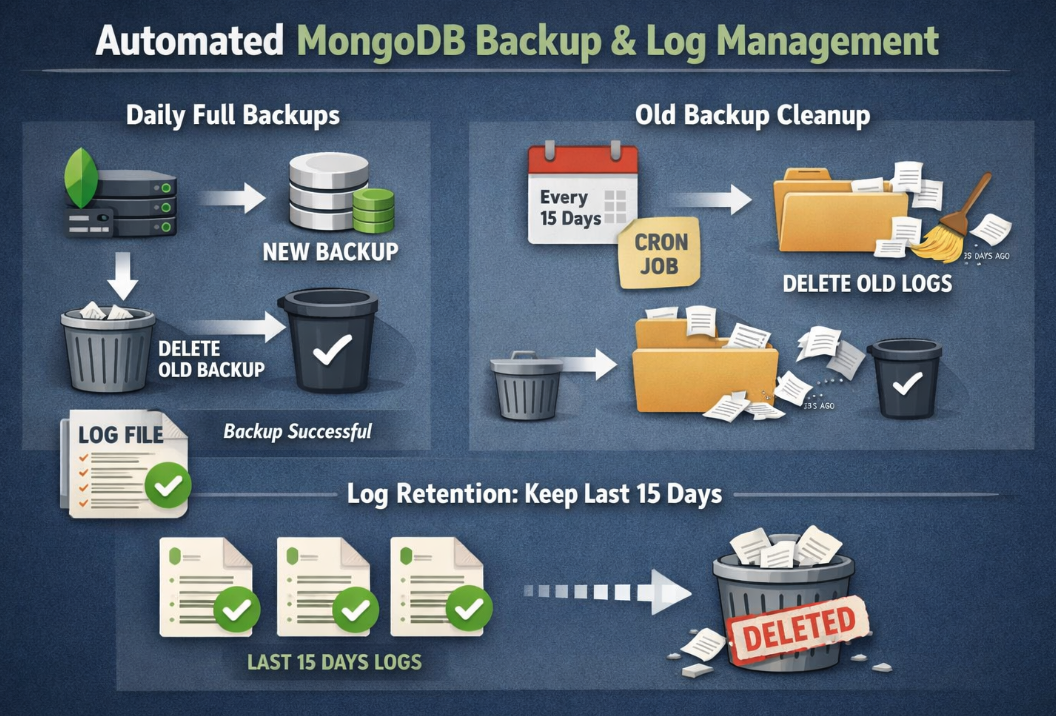
In this post, we are sharing a simple but effective MongoDB full backup script designed for daily use. The script runs on a scheduled basis, creates a full backup every day, and automatically cleans up the previous day’s backup only if the new backup completes successfully. This ensures you always have at least one valid backup available, without letting old files pile up and waste disk space.
On top of that, the script generates a separate log file for each backup run, making it easy to monitor backup status, troubleshoot failures, and keep a clear history of what happened and when.
If you’re looking for a practical, no-nonsense MongoDB backup solution that’s easy to automate and production-friendly, this script is a solid starting point.
Log Retention and Monitoring
In addition to daily backups, log file management is just as important for long-term maintainability.
By adding a cron job, you can automatically clean up log files older than 15 days on a scheduled basis. This approach keeps the log directory lightweight while still preserving enough history to effectively monitor and audit the last 15 days of backup activity.
With this setup:
Old log files are removed automatically at regular intervalsDisk usage remains under control
Recent backup operations stay easily accessible for monitoring and troubleshooting
This small addition helps turn the backup process into a more sustainable and production-ready solution, without requiring manual log cleanup.
#!/bin/bash

################################################################################
# MongoDB Full Backup Script (PROD-tagged)
# - Backup folder: PR-YYYY-MM-DD
# - Backup file: PR-YYYY-MM-DD.archive.gz
# - Log file: backup_log_PR-YYYY-MM-DD.log
# - Deletes yesterday's backup only if today's is successful
# - Author : Can Sayin
################################################################################

# === CONFIG ===
HOST="localhost"
PORT="27017"
USERNAME="admin"
PASSWORD="xxxx@"

BACKUP_ROOT="/backup/mongodb"
EXPECTED_DEV="//ssd01-mongodbackup"

TODAYS_DATE=$(date "+%Y-%m-%d")
YESTERDAYS_DATE=$(date -d "yesterday" "+%Y-%m-%d")

BACKUP_DIR_NAME="PRD-${TODAYS_DATE}"
OLD_BACKUP_DIR_NAME="PRD-${YESTERDAYS_DATE}"

BACKUP_PATH="${BACKUP_ROOT}/${BACKUP_DIR_NAME}"
OLD_BACKUP_PATH="${BACKUP_ROOT}/${OLD_BACKUP_DIR_NAME}"
ARCHIVE_NAME="${BACKUP_DIR_NAME}.archive.gz"

LOG_DIR="${BACKUP_ROOT}/backup_log"
LOG_FILE="${LOG_DIR}/backup_log_${BACKUP_DIR_NAME}.log"

# === Ensure log directory exists ===
mkdir -p "$LOG_DIR"
touch "$LOG_FILE"

echo "[$(date '+%F %T')] 🚀 Starting MongoDB backup job for $BACKUP_DIR_NAME" >> "$LOG_FILE"

# === MOUNT CHECK ===
MOUNTED_DEV=$(findmnt -n -o SOURCE --target "$BACKUP_ROOT")
if [[ "$MOUNTED_DEV" != "$EXPECTED_DEV" ]]; then
echo "[$(date '+%F %T')] ❌ ERROR: $BACKUP_ROOT is NOT mounted correctly! Found: $MOUNTED_DEV" >> "$LOG_FILE"
exit 1
fi

# === Create today's backup directory ===
mkdir -p "$BACKUP_PATH"
cd "$BACKUP_PATH" || {
echo "[$(date '+%F %T')] ❌ ERROR: Failed to enter $BACKUP_PATH" >> "$LOG_FILE"
exit 2
}

# === Run backup ===
echo "[$(date '+%F %T')] 📦 Running mongodump..." >> "$LOG_FILE"
"$MONGO_DUMP_BIN_PATH" --host "$HOST:$PORT" \
-u "$USERNAME" -p "$PASSWORD" \
--authenticationDatabase admin \
--archive="$ARCHIVE_NAME" --gzip >> "$LOG_FILE" 2>&1

# === Verify archive ===
if [ -f "$ARCHIVE_NAME" ]; then
ARCHIVE_SIZE=$(du -sh "$ARCHIVE_NAME" | cut -f1)
echo "[$(date '+%F %T')] ✅ Backup successful: $ARCHIVE_NAME ($ARCHIVE_SIZE)" >> "$LOG_FILE"

# === Delete yesterday’s backup if exists ===
if [ -d "$OLD_BACKUP_PATH" ]; then
rm -rf "$OLD_BACKUP_PATH"
echo "[$(date '+%F %T')] 🗑️ Deleted previous backup: $OLD_BACKUP_PATH" >> "$LOG_FILE"
else
echo "[$(date '+%F %T')] ℹ️ No previous backup to delete: $OLD_BACKUP_PATH not found (first run?)" >> "$LOG_FILE"
fi
exit 0
else
echo "[$(date '+%F %T')] ❌ ERROR: Backup failed – archive not created" >> "$LOG_FILE"
exit 3
fi