Most vector search tutorials stop at the shell. You paste an aggregation into mongosh, see ten documents come back ranked by similarity, and the article ends. That’s a useful checkpoint, but it isn’t a feature. The interesting part starts when the query has to run inside a request handler, with a user’s typed question on one side and a rendered results page on the other.
The good news is that there’s almost nothing new to learn. $vectorSearch is an aggregation pipeline stage, so every official driver already supports it — Node.js, Python, Ruby, Go, Java, C#. If you know how to call aggregate() in your language, you know how to run a vector search. What trips people up isn’t the driver API; it’s the handful of rules the stage itself enforces.
We’ll build the same feature in three languages: semantic search over a help-center knowledge base, where a user types “my card was declined at checkout” and we surface articles about payment failures even though none of them contain that exact phrasing.
Before any code runs: the index
$vectorSearch will not fall back to a collection scan. If there’s no vector index covering the field you name, the query fails. So the index comes first.
Assume our support_articles collection looks roughly like this:
{
  "_id": "...",
  "title": "Why your payment might be declined",
  "body": "Card issuers decline transactions for several reasons...",
  "locale": "en",
  "product_area": "billing",
  "published": true,
  "embedding": [0.0142, -0.0871, 0.0339, ...]
}
The matching Atlas Search index definition:
{
  "fields": [
    {
      "type": "vector",
      "path": "embedding",
      "numDimensions": 1536,
      "similarity": "cosine"
    },
    { "type": "filter", "path": "locale" },
    { "type": "filter", "path": "product_area" },
    { "type": "filter", "path": "published" }
  ]
}
Three things here decide whether the rest of your day goes smoothly:
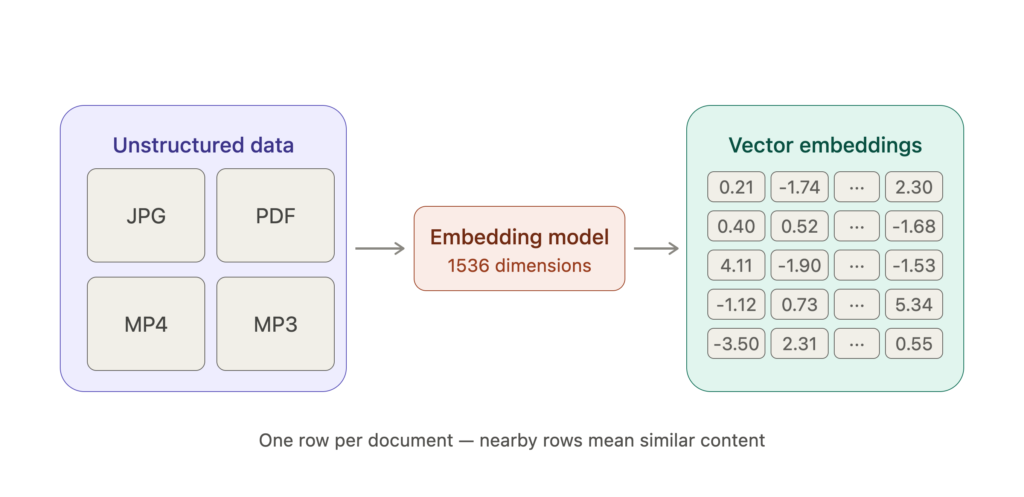
numDimensions must match your embedding model exactly. If you’re generating vectors with a model that outputs 1536 floats and the index says 768, every insert-then-query cycle produces confusing failures.
similarity should match how the model was trained. Cosine is the safe default for most text embedding models. Use dotProduct only if your vectors are already normalized — it’s faster, but silently wrong on unnormalized input. euclidean is uncommon for text.
Every field you intend to filter on must be declared as type: "filter". This is the single most common surprise. You cannot filter on an arbitrary field at query time and hope for the best; if locale isn’t in the index, filtering by it throws an error.
The shape of the query
Here’s the stage on its own, before we wrap it in any language:
{
  $vectorSearch: {
    index: "support_articles_vector",
    path: "embedding",
    queryVector: [ /* the user's question, embedded */ ],
    numCandidates: 200,
    limit: 8
  }
}
limit is what you get back. numCandidates is how many approximate neighbours the search traverses before ranking and truncating to limit. That second number is the quality-versus-latency dial: raise it and results get closer to a true exhaustive search, at the cost of time. A reasonable starting point is 15–20× your limit, then tune against real queries. Setting numCandidates to limit is a common mistake that quietly degrades relevance.
Two more things worth knowing:
$vectorSearchmust be the first stage in the pipeline. It can’t come after a$match.- The similarity score isn’t in the returned documents by default. Add
$projectwith{ $meta: "vectorSearchScore" }to see it — you’ll want it for debugging and for setting a relevance cutoff.
Node.js
const { MongoClient } = require("mongodb");

// Reuse one client across the process. Don't connect per request.
const client = new MongoClient(process.env.MONGODB_URI);

async function searchArticles(queryVector, { locale = "en", limit = 8 } = {}) {
  const articles = client.db("helpcenter").collection("support_articles");

  const pipeline = [
    {
      $vectorSearch: {
        index: "support_articles_vector",
        path: "embedding",
        queryVector,
        numCandidates: limit * 20,
        limit,
        filter: {
          locale,
          published: true
        }
      }
    },
    {
      $project: {
        _id: 1,
        title: 1,
        product_area: 1,
        // Surface the score so we can threshold on it below.
        score: { $meta: "vectorSearchScore" }
      }
    }
  ];

  const hits = await articles.aggregate(pipeline).toArray();

  // Cosine scores land in [0, 1]. Anything under ~0.7 is usually noise —
  // calibrate this number against your own data before trusting it.
  return hits.filter((hit) => hit.score >= 0.7);
}
Note the filter key sitting inside the stage rather than in a separate $match. That placement matters, and the next section explains why.
Python, and why filter placement matters
from pymongo import MongoClient

client = MongoClient(MONGODB_URI)

def search_articles(query_vector, locale="en", product_area=None, limit=8):
    articles = client["helpcenter"]["support_articles"]

    conditions = {"locale": locale, "published": True}
    if product_area:
        conditions["product_area"] = product_area

    pipeline = [
        {
            "$vectorSearch": {
                "index": "support_articles_vector",
                "path": "embedding",
                "queryVector": query_vector,
                "numCandidates": limit * 20,
                "limit": limit,
                # Applied during the search, not after it.
                "filter": conditions,
            }
        },
        {
            "$project": {
                "title": 1,
                "product_area": 1,
                "score": {"$meta": "vectorSearchScore"},
            }
        },
    ]

    return list(articles.aggregate(pipeline))
It’s tempting to write this instead:
# Don't do this.
pipeline = [
    {"$vectorSearch": {...}},          # returns 8 documents
    {"$match": {"product_area": "billing"}},  # ...then throws most of them away
]
That version compiles, runs, and returns garbage. The vector stage picks its 8 nearest neighbours across the whole collection, and only then does $match discard the ones from the wrong product area. Ask for eight results and you may get one. Ask for a narrow category and you may get zero, even though hundreds of good matches exist.
The inline filter avoids this by constraining the candidate set during traversal. You ask for eight billing articles and you get eight billing articles. This is the difference between a pre-filter and a post-filter, and it’s the reason those fields had to be declared in the index definition upfront.
Post-filtering with $match isn’t always wrong — it’s fine for conditions you couldn’t index, applied on a deliberately oversized limit. But it should be a conscious choice, not an accident.
Ruby
require 'mongo'

CLIENT = Mongo::Client.new(ENV.fetch('MONGODB_URI'))

def search_articles(query_vector, locale: 'en', limit: 8)
  articles = CLIENT.use('helpcenter')[:support_articles]

  pipeline = [
    {
      '$vectorSearch' => {
        'index' => 'support_articles_vector',
        'path' => 'embedding',
        'queryVector' => query_vector,
        'numCandidates' => limit * 20,
        'limit' => limit,
        'filter' => { 'locale' => locale, 'published' => true }
      }
    },
    {
      '$project' => {
        'title' => 1,
        'product_area' => 1,
        'score' => { '$meta' => 'vectorSearchScore' }
      }
    }
  ]

  articles.aggregate(pipeline).to_a
end
Structurally identical. That’s the point — once the stage is correct, porting it is mechanical.
Where the query vector comes from
Every example above takes queryVector as a parameter, which quietly skips the step that has to happen on every single request: turning the user’s text into numbers.
async function embed(text) {
  const res = await fetch("https://api.your-embedding-provider.com/v1/embeddings", {
    method: "POST",
    headers: {
      "Content-Type": "application/json",
      Authorization: `Bearer ${process.env.EMBEDDING_API_KEY}`
    },
    body: JSON.stringify({ model: "text-embedding-3-small", input: text })
  });

  if (!res.ok) throw new Error(`Embedding failed: ${res.status}`);

  const data = await res.json();
  return data.data[0].embedding;
}

// The full round trip.
const results = await searchArticles(await embed(userQuestion));
Two rules that are easy to violate and hard to debug:
- Use the same model for queries as you used for the documents. Vectors from two different models occupy unrelated coordinate spaces. Mixing them doesn’t error — it just returns nonsense with plausible-looking scores.
- Budget for the network hop. The embedding call is often slower than the database query. Cache aggressively for repeated queries, and keep an eye on the combined latency rather than the Atlas metrics alone.
Symptoms and causes
Empty results, no error. Usually a filter on a field that’s indexed but doesn’t match anything — published: true when your seed data left the field unset. Drop the filter and re-run to confirm.
“Path not found” or index errors. The index name is wrong, or the index is still building. New vector indexes take time to become queryable on large collections.
Results ignore your filter. You used $match after the stage instead of filter inside it.
Relevance is mediocre and won’t improve. Check numCandidates first. Then check whether you’re embedding the right text — indexing only article titles when users search in full sentences is a frequent mismatch. Embedding title plus a body excerpt usually helps more than any parameter tuning.
Everything scores around 0.5. Likely a dimension or similarity mismatch between model and index. Verify both against the model’s documentation.
Wrapping up
The mechanical part of vector search is genuinely small: declare an index, put $vectorSearch first in a pipeline, keep filters inside the stage, and project the score so you can see what the engine is thinking. Everything after that — chunking strategy, score thresholds, whether to blend semantic results with traditional keyword search — is product work, and it’s where the actual quality lives.
Start with the smallest version that returns something reasonable. Log the scores. Then tune against queries your real users are typing, not the ones you imagined they would.