
Supported Databases
PostgreSQL
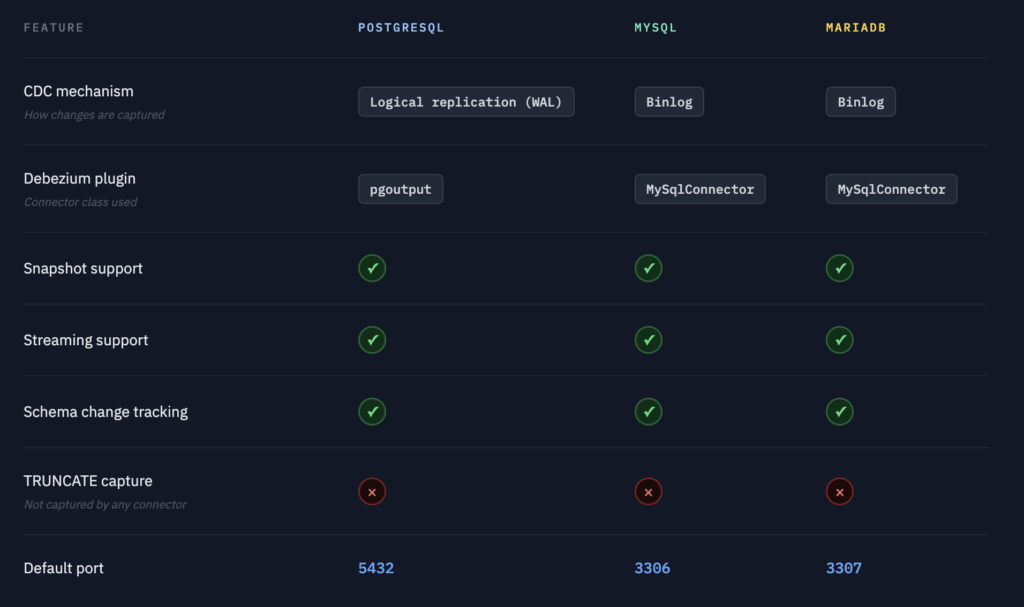
Debezium connects to PostgreSQL using logical replication with the pgoutput plugin, which is built into PostgreSQL 10 and later. No additional extensions are required.
How it works: PostgreSQL writes every committed transaction to its Write-Ahead Log. Debezium creates a replication slot and reads from this log in real time. The pgoutput plugin decodes the WAL entries into structured change events.
Requirements:
- PostgreSQL 10 or later
wal_level = logicalinpostgresql.conf- The connecting user must have the
REPLICATIONattribute SELECTprivilege on all replicated tables
What is captured: All INSERT, UPDATE, and DELETE operations. Schema changes are optionally captured when include.schema.changes is enabled.
Limitations: Truncate operations (TRUNCATE TABLE) are not captured. Sequences and views are not replicated.
MySQL
Debezium connects to MySQL using binlog replication — the same mechanism used for MySQL primary-replica setups.
How it works: MySQL writes every committed transaction to its binary log. Debezium registers itself as a replica and reads the binlog stream in real time.
Requirements:
- MySQL 5.7 or later (8.0 recommended)
log_bin = ONinmy.cnfbinlog_format = ROWbinlog_row_image = FULL- The connecting user needs:
SELECT,RELOAD,SHOW DATABASES,REPLICATION SLAVE,REPLICATION CLIENT,LOCK TABLES
What is captured: All INSERT, UPDATE, and DELETE operations across all selected tables.
Limitations: DDL changes (ALTER TABLE) are tracked internally by Debezium for schema evolution but are not forwarded to ClickHouse as events.
MariaDB
MariaDB uses the same Debezium MySQL connector under the hood. The binlog format and replication protocol are identical to MySQL, so the same configuration applies.
Requirements:
- MariaDB 10.5 or later
log_bin = ONinmy.cnfbinlog_format = ROWbinlog_row_image = FULL- Same user privileges as MySQL
Note: MariaDB listens on port 3307 in the bundled demo stack to avoid conflicts with the MySQL container on 3306.
MongoDB
Debezium connects to MongoDB using Change Streams — MongoDB’s native real-time event API introduced in version 3.6.
How it works: MongoDB Change Streams are built on top of the oplog, MongoDB’s internal replication log. Debezium subscribes to the Change Stream on the replica set and receives every document-level change as it is committed. Unlike the relational connectors, there is no binlog or WAL to read — the Change Stream is a higher-level abstraction that handles cursor management and resumability automatically.
Requirements:
- MongoDB 4.0 or later
- Must be running as a replica set (even a single-node one). Change Streams are not available on standalone instances.
- The connecting user needs:
readon all replicated databases,readAnyDatabasefor cross-database access,changeStreamprivilege
What is captured: All document-level INSERT, UPDATE, REPLACE, and DELETE operations across all selected collections.
Limitations: MongoDB is schemaless — documents in the same collection can have different fields. BlancoByte infers the schema by sampling existing documents at pipeline creation time. New fields that appear after the pipeline starts are stored as JSON strings rather than typed columns. Nested objects and arrays are stored in ClickHouse as String columns containing valid JSON — use JSONExtractString, JSONExtractFloat, and JSONExtractArrayRaw to query them.
Note: The bundled bb-mongodb container starts with --replSet rs0 and a single-node replica set is bootstrapped automatically on first run.
Couchbase
Couchbase uses a different replication mechanism from the other supported sources. Instead of a transaction log or change stream, Couchbase exposes DCP — Database Change Protocol — its internal binary protocol for streaming all data changes across a bucket.
How it works: The Couchbase Kafka Connector connects to Couchbase via DCP and receives a continuous stream of every document mutation, deletion, and expiration across all vBuckets in the bucket. Each event is published to a Kafka topic in the format {bucket}.{scope}.{collection}. BlancoByte Sink consumes this topic, base64-decodes the document payload, and maps each JSON field to the corresponding ClickHouse column.
Requirements:
- Couchbase Server 6.5 or later
- The Data, Query, and Index services must be enabled on the cluster
- The connecting user needs:
Data Reader,Data Writer,Query Selectprivileges on the target bucket - The Couchbase Kafka Connector is built from source automatically during
docker-compose build(takes approximately 10–15 minutes on first run)
What is captured: All document mutations (INSERT equivalent), deletions (DELETE equivalent), and expirations across all selected collections.
Limitations: Couchbase is schemaless — column types are inferred by sampling existing documents at pipeline creation time using USE KEYS queries. A primary index is required for N1QL-based sampling; without it, BlancoByte falls back to a predefined schema. Arrays and nested objects are stored in ClickHouse as String columns containing valid JSON. Unlike the relational connectors, there is no before-image — only the full document state after the mutation is available.
Note: The bundled bb-couchbase container initializes the cluster, creates the sourcedb bucket, and seeds 5 employee documents automatically. Initialization takes approximately 3–4 minutes. Monitor progress with docker logs bb-couchbase-init --follow.
Feature comparison
CDC Metadata Columns
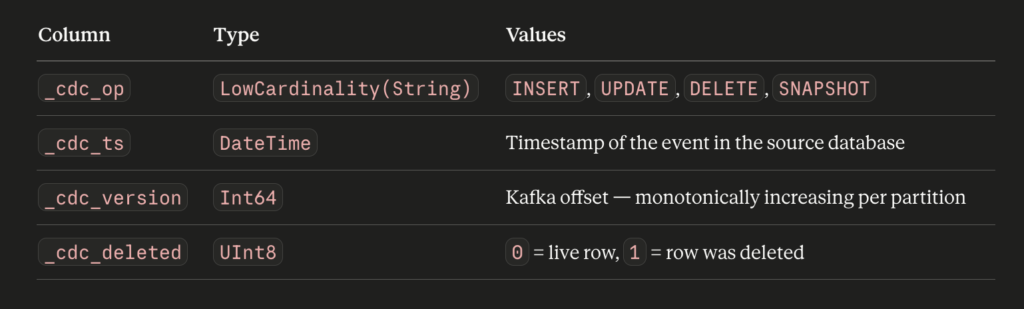
Every table replicated by BlancoByte CDC receives four additional columns automatically. These columns are added to the ClickHouse destination table — your source database is never modified.
_cdc_op
The operation type. SNAPSHOT is used for rows captured during the initial snapshot phase — these are existing rows in your source database at the time the pipeline was started, not new changes. After the snapshot completes, all subsequent operations are INSERT, UPDATE, or DELETE.
_cdc_ts
The exact timestamp when the event was committed in the source database. This is not the time the event arrived in ClickHouse — it is the source timestamp extracted from the transaction log. Useful for latency measurement and time-based filtering.
_cdc_version
The Kafka offset of the event. Because offsets are monotonically increasing, _cdc_version acts as a reliable ordering key. ReplacingMergeTree uses this column to determine which row is “latest” — the row with the highest _cdc_version for a given primary key wins during deduplication.
_cdc_deleted
When a row is deleted in the source database, BlancoByte CDC does not delete the row from ClickHouse. Instead, it inserts a new row with _cdc_deleted = 1. This preserves the full change history and avoids expensive delete operations on ClickHouse. To query only live rows, always filter with WHERE _cdc_deleted = 0.
The FINAL keyword
ClickHouse’s ReplacingMergeTree merges duplicate rows in the background on its own schedule. Until a merge runs, multiple versions of the same row may coexist in the table. The FINAL modifier forces deduplication at query time:
-- Without FINAL — may return multiple versions of the same row
SELECT * FROM cdc.users WHERE id = 1;

-- With FINAL — always returns exactly one row per primary key
SELECT * FROM cdc.users FINAL WHERE id = 1;
FINAL is slightly slower on large tables because it does extra work at query time. For dashboards and analytics, it is the correct default. For high-throughput aggregations where a small amount of duplication is acceptable, you can omit it.


