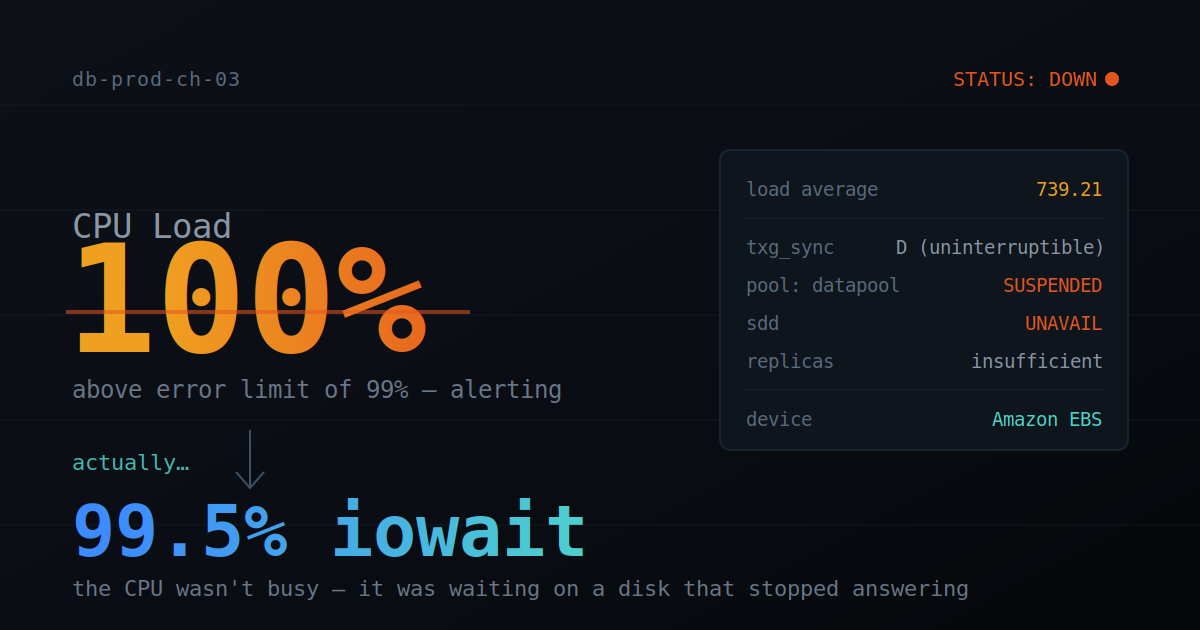
A production ClickHouse node alerted as "CPU at 100%." The CPU was doing almost nothing.
That contradiction is the whole story. When a disk stops responding, the CPU doesn't sit idle waiting — it enters iowait, a state that means "blocked, waiting on I/O." Many monitoring tools, SNMP included, fold iowait into a single "CPU load" figure. So a storage failure wears a CPU costume: the alert isn't wrong, just indirect — the real cause is underneath. Here's the trail from that misleading alert down to a single EBS volume that had quietly stopped answering.
The alert
db-prod-ch-03 Down (100% (Total) is above the error limit of 99%)
Sensor: CPU Load (SNMP CPU Load) — Status: Down
A production ClickHouse node reporting 100% CPU, flagged Down. The obvious suspects for any ClickHouse operator: a runaway query, a merge storm, a stuck mutation. All wrong — and the first lesson was in how we found that out.
The database won't answer
SELECT query_id, user, elapsed, query
FROM system.processes ORDER BY elapsed DESC;
Three minutes later, still no result. That alone is a finding: system.processes reads in-memory state and returns instantly. If it hangs, the server isn't busy — it's blocked on something beneath it. Time to ask the OS instead.
The OS rewrites the diagnosis
top - load average: 739.21, 728.11, 688.82
%Cpu(s): 0.4 us, 0.0 id, 99.5 wa
MiB Mem: 66076 free — Swap: 0 used
99.5 wa— 99.5% iowait. The CPU isn't computing (us0.4%,id0%); it's waiting on disk. This is the costume in action: SNMP saw a "busy" CPU and fired a load alert, but nothing was actually being computed.load 739— Linux counts I/O-blocked (D-state) threads in load average. 739 means hundreds of threads wedged waiting for a disk.- Memory fine — 66 GB free, no swap, no OOM. Pure storage starvation.
Not a query, not a merge, not RAM. Something under the filesystem stopped responding.
Down to the disk
$ ps -eo state,pid,comm,wchan | grep '^D'
D  873 txg_sync   -      # ZFS's transaction-group flush thread, stuck
txg_sync stuck means ZFS can't complete a write; everything queues behind it. The pool confirmed why:
$ zpool status -v datapool
 state: SUSPENDED
        datapool  UNAVAIL   insufficient replicas
          sdd     UNAVAIL
SUSPENDED, single device sdd UNAVAIL, and the key phrase: insufficient replicas — a single-disk pool, no mirror, no redundancy.
The chain: the device threw an I/O error → with no redundancy, ZFS suspended the whole pool to protect data → txg_sync hung → all ClickHouse I/O queued behind it → load 739, iowait 99.5% → node dark, SNMP says "100% CPU." ClickHouse wasn't the culprit; it was the victim.
Dead disk, or just gone?
$ ls -l /dev/sdd        →  /dev/sdd -> nvme1n1   # Nitro: EBS shown as NVMe
$ lsblk                 →  nvme1n1 present, 1.5T, ZFS partition intact
$ sudo dd if=/dev/nvme1n1 of=/dev/null bs=4k count=1
   4096 bytes copied, 0.0007 s   # reads fine, right now
The device was present and readable at that moment. So what happened at the failure itself? The journal:
00:24:01  kernel: audit: ... (normal)
00:24:02  kernel: WARNING: Pool 'datapool' ... suspended.
The most telling detail in the whole incident: no nvme timeout, no blk_update_request, no controller reset between the normal message and the suspend. A dying disk announces itself with retries and resets. This was a clean, instant cut — the signature of an abrupt loss of access to a network-attached volume, not a failing drive. Confirmed as EBS:
$ sudo nvme id-ctrl /dev/nvme1n1 | grep mn
mn : Amazon Elastic Block Store
Recovery
Three principles drove it:
zpool cleardoesn't delete data. It resets error counters and resumes I/O. The only thing ever at risk is the few seconds of writes in flight at suspension — which had already failed at the app layer. Committed data was safe (last scrub:0B repaired, 0 errors). This was loss of access, not corruption.- Snapshot first. On a no-redundancy pool, an EBS snapshot is the only safety net. It runs at the infra layer and only needs to start before proceeding.
- Renaming won't break the import. ZFS imports by on-disk GUID, not device name — a
nvme0↔nvme1re-enumeration can't orphan the pool. Worth stressing: the GUID protects against renaming, but gives zero protection against loss of access. Different failure modes, often conflated.
The volume needed a clean reattach, so the instance was given a stop/start. On boot it reattached and ZFS imported by GUID:
$ zpool status -v datapool
 state: ONLINE
        datapool  ONLINE  0 0 0
          sdd     ONLINE  0 0 0
errors: No known data errors
The aftershock
ClickHouse came up, but the first query hung again and DDL-queue alerts fired (ddl_queue_length: 444). The OS was reassuring, though — load 15 (from 739), iowait 6% (from 99.5%), up only 8 minutes. Storage was healthy; ClickHouse was still loading parts, and the cluster's ON CLUSTER DDL queue had backed up while the node was gone:
Distributed DDL task ... not finished on 1 of 3 hosts.
Waiting 180.76s > distributed_ddl_task_timeout (TIMEOUT_EXCEEDED)
Not a new failure — an expected side effect of an hour-long outage. As the node worked through the backlog, the queue drained and the cluster re-synced on its own.
(A separate JDBC bug surfaced in the noise — an old client that only decodes LZ4 failing on the server's new ZSTD wire codec. Unrelated to the disk; fixed cleanly by updating the driver. Flagged here only because mid-incident it's tempting to blame everything on the incident.)
What we changed
- Redundancy. One EBS blip took down a single-disk pool for over an hour. Fix: a ZFS mirror, or at minimum snapshot + off-host replication.
- Alert on the real thing. "100% CPU" was the costume, not the cause. We now monitor pool state directly, so a
SUSPENDEDpool pages us as that — diagnosis in seconds, not an hour. - Backup the data, not just trust the disk. Checksums and a clean scrub gave confidence, but confidence isn't a backup. Off-host replication is the top follow-up — next time the volume might not come back.
TL;DR
A node alerted as "100% CPU" was actually at 100% iowait: the single EBS volume behind a no-redundancy ZFS pool lost access, ZFS suspended the pool, txg_sync hung, and all DB I/O blocked behind it. The disk was fine — a stop/start reattached it, ZFS re-imported by GUID, ClickHouse recovered. Root cause wasn't the database; it was a storage-layer single point of failure plus an alert that described the symptom, not the cause.
Keepers: check wa before blaming the database — iowait wears a CPU costume. ZFS imports by GUID, so renaming is harmless — but that GUID won't save you from loss of access. And redundancy isn't optional for anything you'd be paged about at 1 a.m.